
New York City's rental vacancy rate fell to 1.41% in 2023, and rent-stabilized apartments were even harder to find, with a vacancy rate of 0.98% during the survey period (NYC Housing and Vacancy Survey, NYC Comptroller analysis of rent-stabilized vacancies). That's the reality behind a search for available apartments in NYC: the challenge isn't just choosing the right neighborhood or negotiating well. It's seeing a suitable listing while it's still available, then responding with enough speed and preparation to get a viewing.
A passive routine of checking one website when you have time leaves gaps. Build a search that watches several sources, sends useful alerts, and lets you act without scrambling for documents or figuring out your budget at the last minute.
Table of Contents
- Why Finding Available Apartments in NYC Is a Speed Problem
- Setting Search Criteria That Actually Match What Is Available
- Where NYC Listings Actually Appear First
- Setting Alerts That Beat the Crowd
- Timing and the Race From Listing to Viewing
- Separating Genuine Rent-Stabilized Listings From the Label
- Your 30-Day NYC Apartment Search Plan
Why Finding Available Apartments in NYC Is a Speed Problem
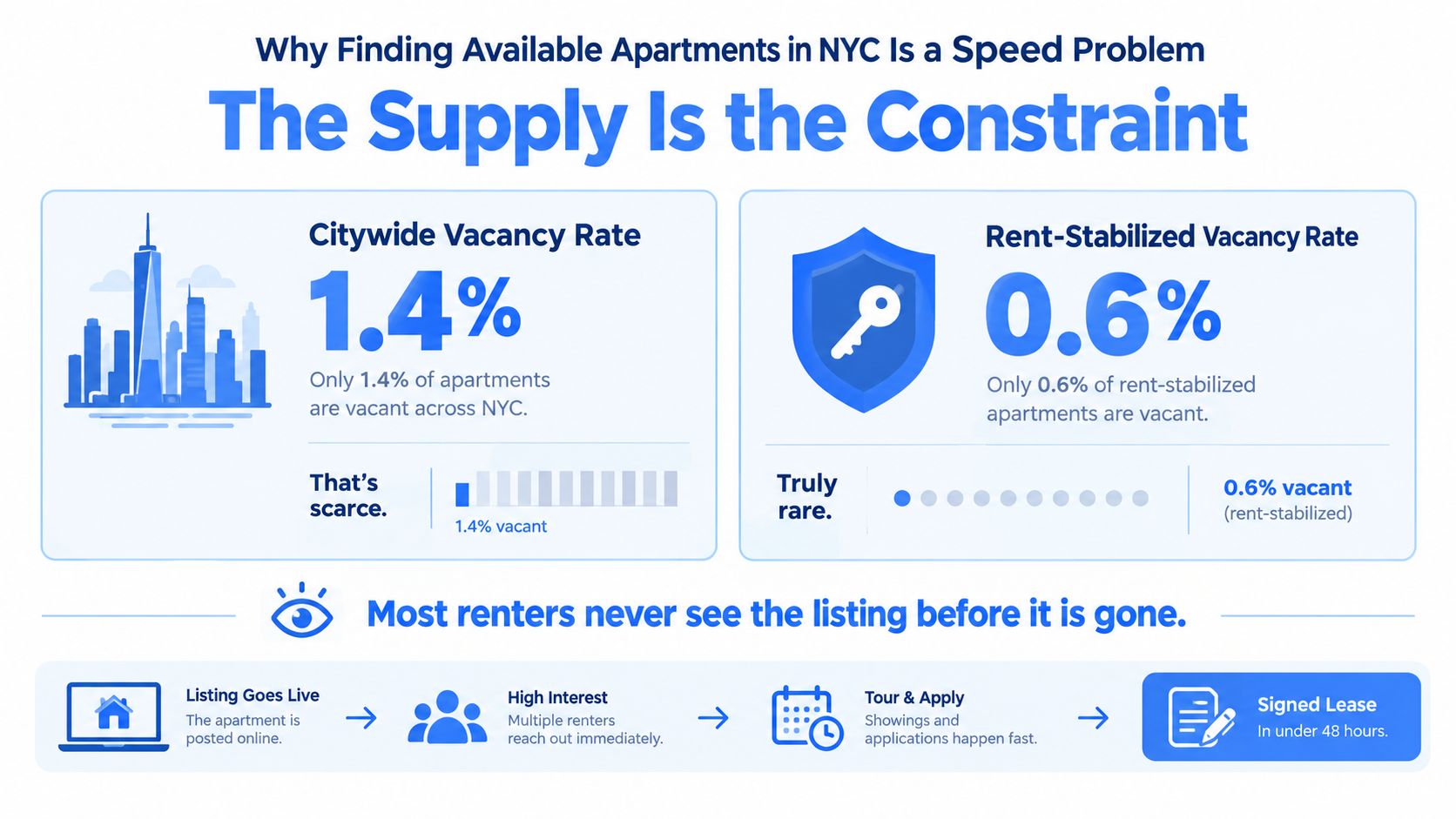
The city's 2023 net rental vacancy rate was 1.41%, among the lowest recorded since the Housing and Vacancy Survey began. For apartments renting below $1,650, the rate was under 1%. The survey counted 33,210 units available for rent among approximately 2.357 million occupied and vacant rental units (NYC Housing and Vacancy Survey findings).
A large rental housing stock does not mean many apartments are immediately available. When vacancies are scarce, a suitable listing can draw attention fast, especially at lower rents. A search for available apartments in NYC is therefore a race against other renters.
Scarcity changes the job
Rent-stabilized apartments show the gap between total housing stock and available rentals even more sharply. Their 2023 vacancy rate was 0.98%, down from 4.57% in 2021. Fewer than one in every hundred stabilized apartments was vacant and available during the survey period (NYC Comptroller analysis of rent-stabilized vacancies).
Checking one site more often is not a search strategy. Listings appear across marketplaces, broker pages, and building websites, so manual browsing leaves gaps: you only see what you check, and only when you check it. By the time you spot a match, other renters may already be booking viewings.
Practical rule: Build coverage and speed into your search. Use alerts to keep watch while you work, sleep, or commute, and make sure each alert points to a clear next step.
Set your approach before a listing appears: know what you'll consider, monitor multiple sources, and be ready to contact the broker or landlord as soon as a credible match comes up. Negotiation cannot help if you never see the apartment. First, make sure your search covers enough of the available inventory to give you a genuine choice.
Setting Search Criteria That Actually Match What Is Available
A vague search creates a noisy inbox. An overly strict one hides apartments you might take. Start with the details that determine whether a listing is viable, then add filters that help separate useful matches from clutter.

Set a monthly rent ceiling based on what you can sustain, not just what looks attractive in a search box. Include likely move-in costs in your planning: fees, deposit, utility obligations, and any concession that changes after the initial lease period. A listing's advertised rent isn't the same thing as your complete move-in or renewal budget.
Then build a neighborhood list in layers. Put your preferred areas first, but include a stretch neighborhood where the commute or amenities still work even if it wasn't your first choice. Add the bedroom count and move-in window. Separate must-haves, such as a pet policy or laundry access, from preferences you'd trade away for the right apartment. For a fuller set of filter ideas, use this NYC rental search filters guide.
Use filters to reduce noise, not possibility
Square footage and amenities can help, but don't let an arbitrary minimum erase an otherwise suitable apartment. If you care about natural light, storage, or an elevator, decide which is essential and which is negotiable. You can also set a minimum photo count to screen out low-effort listings, but treat it as a quality signal, not proof that a listing is legitimate.
Consider two searchers. A couple looking for a Brooklyn one-bedroom might begin with a narrow neighborhood list, then add a nearby area after seeing that their first alerts rarely fit their total budget. A first-time renter searching alone for a studio may prioritize a firm rent ceiling and commute, while leaving building amenities flexible. These are examples of how to adjust criteria, not claims about current prices or availability.
Review your criteria after the first round of alerts. If every match is clearly unsuitable, tighten the filters. If you're seeing too little, loosen a preference before raising your rent ceiling. The sweet spot is a search broad enough to catch well-priced long-tail listings, but focused enough that you can respond immediately when a true fit appears.
Where NYC Listings Actually Appear First
With NYC inventory so scarce, relying on one search site is a quick way to miss an apartment. StreetEasy, Zillow, Craigslist, Open Igloo, RentHop, Leasebreak, brokerage feeds, and landlord-managed building sites each show part of the market. Some apartments appear across several platforms; others surface only through a particular broker, owner, or channel. Manual browsing makes that coverage gap worse: checking one site at a time can leave a listing unseen until it's already gone.
RentReboot's Summer 2026 platform study matched 50,130 NYC apartments to compare observed platform coverage and first-publication timing. StreetEasy covered 77.1% of the studied listings and was the first observed source for 69.8%. Yet 51.3% of apartments appeared on exactly one platform, which means even the leading source could not capture the full set.
| Platform or source | What to use it for | What to watch |
|---|---|---|
| StreetEasy | A major source of NYC listings and a strong anchor for saved searches. | It doesn't show everything. Verify each listing before acting. |
| Zillow | Another marketplace for overlapping listings and options you may not see elsewhere. | Check that the apartment is still available and details match any other versions. |
| Craigslist | A separate channel that may surface listings outside larger marketplaces. | Scrutinize the poster, apartment details, and any request for money. |
| Open Igloo and RentHop | Extra coverage and another place to compare listing information. | Check for duplicates and inconsistent descriptions. |
| Leasebreak | A channel for lease takeovers or shorter-term arrangements. | Confirm dates, permission to sublet or assign, and the actual terms. |
| Brokerage feeds and landlord-managed buildings | Direct updates from brokerages and buildings you'd consider renting from. | Availability and details may vary across channels. |
Build a portfolio, then deduplicate
Use StreetEasy as your anchor, then add other marketplaces and relevant brokerage or landlord sites. Set up searches across those sources instead of relying on manual browsing to catch each new post. When an apartment appears more than once, compare its address, photos, rent, availability, and contact details. Treat matching posts as one option, not several.
Coverage comes with a verification job. A platform's name does not prove that a listing is genuine, and scam or duplicate risk varies by source. Before sending money, confirm the apartment, the contact's authority to rent it, and the payment terms. If details conflict, ask for clarification before booking a viewing.
The practical choice is a parallel search, not one favorite website. Monitor several sources and remove duplicates so a single-platform listing has a chance to reach you. Use manual browsing to explore neighborhoods, not as your system for catching new inventory.
Setting Alerts That Beat the Crowd
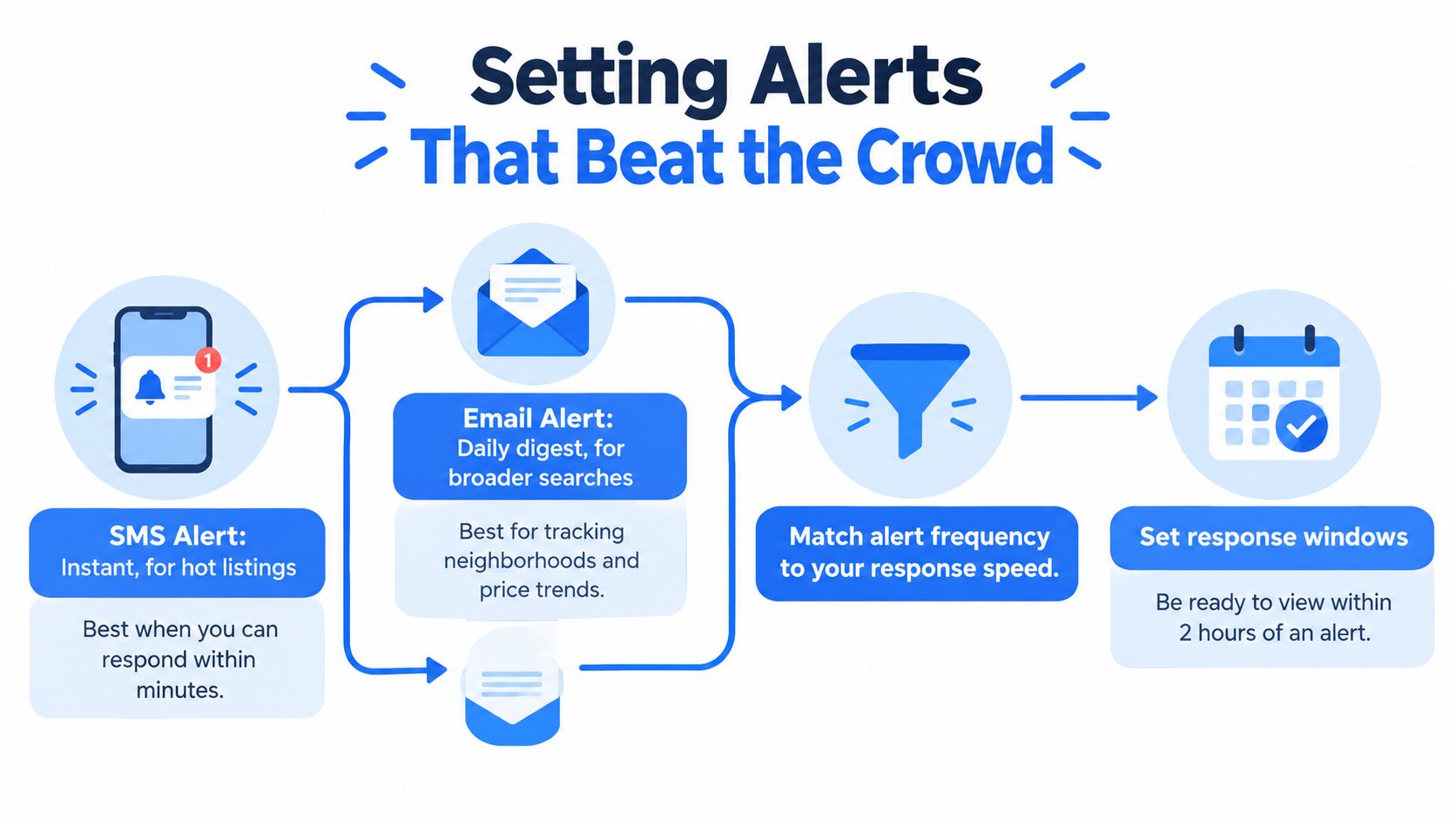
An alert only helps if it reaches you through a channel you'll notice and includes enough detail to make a decision. Set notifications according to how quickly you can respond, not according to how many emails you're willing to receive.
Match the alert to the action
Use SMS for a listing that meets your firm requirements and stays within your budget, provided you can act when the message arrives. Use email for a digest of stretch neighborhoods, broader searches, or listings you want to compare later. If you're tracking potentially rent-stabilized apartments or unusually low-priced options, give those alerts a separate, easy-to-notice channel, then verify the claims before applying.
A useful alert should tell you more than the headline rent. Look for the neighborhood, bedroom count, address or cross streets when available, move-in timing, listing link, and any information about fees or concessions. If the alert omits something that could disqualify the apartment, treat it as a prompt to check the listing, not as a complete summary.
For more on creating a practical notification routine, see RentReboot's NYC apartment alerts guide. The service monitors more than 20 rental platforms and can send matches by email or SMS based on saved criteria. Whatever tools you use, set the search once and make sure the notifications continue to run across your normal day.
Control alert fatigue before it controls you
Mute categories that repeatedly send you listings you'd never consider. Keep essential filters active for budget and bedroom count, and don't silence the channel you rely on for genuine must-have matches. If your inbox fills with duplicates, adjust the search or use a tracker to record which listings you've already reviewed.
Set up the response before the alert arrives. Keep a shared inbox or phone number for the search, prepare a short reply, and have your documents ready to attach. Reserve time for a same-day viewing when your schedule allows. The aim is to make the gap between alert and contact minutes rather than days.
Timing and the Race From Listing to Viewing
You can't control when an apartment appears. You can control whether you're ready to contact the broker, arrange a viewing, and submit an application without starting from scratch. In a tight market, that preparation matters more than repeatedly refreshing a page.

Prepare the application package in advance
Keep clean digital copies of the documents a landlord or broker may request. That can include your ID, recent pay stubs, bank statements, and a landlord reference or employment confirmation. Requirements vary, so don't assume every application will ask for the same package. Share sensitive documents only through a channel you trust, and confirm the recipient and the listing before sending them.
Write a short message you can personalize quickly. Include your move-in timing, who will occupy the apartment, whether you can attend a viewing, and a phone number or email where the contact can reach you. Ask a direct question if a key detail is missing, such as the full recurring charges or available viewing times.
When you receive an alert, open the listing and confirm it's current. Contact the broker or landlord promptly, offer a few windows that work for you, and ask whether they're showing the apartment individually or in a group. If the first time slot conflicts with work, offer a clear alternative and say when you can confirm. Don't send a deposit just to secure a viewing.
Watch this video on how to navigate an NYC apartment search as a prompt to check your own process. The useful question isn't whether you can move at every hour; it's whether you can make a clear plan as soon as you find a viable listing.
For example, an alert arrives while you're available. You check the details, send a personalized inquiry, and offer a viewing window that day. After seeing the apartment, you compare the full costs with your budget and submit a complete application if the terms still work. If your process stalls, find the bottleneck: an alert you didn't see, documents you had to assemble, unanswered questions about fees, or an inflexible viewing schedule.
Pass when the apartment doesn't meet your essentials, the costs don't fit, or the contact won't provide basic information. Speed means removing avoidable delay, not agreeing to conditions you haven't checked.
Separating Genuine Rent-Stabilized Listings From the Label
Rent-stabilized housing is a meaningful part of the city's rental system, but the number of regulated apartments doesn't tell you how many are available to rent right now. About 1 million apartments are rent stabilized, representing roughly 41% of the city's rental apartments. Yet the 2023 vacancy rate for stabilized units was just 0.98% (NYC Independent Budget Office analysis of rent-stabilized housing).
That scarcity makes verification more important, not less. A listing that says “rent stabilized” is making a claim. It isn't documentary proof of the apartment's legal status, lawful rent, or future renewal terms.
Ask for records before paying
Before you submit an application fee or deposit, ask for the legal regulated rent, whether the landlord is charging a preferential rent, the lease rider, and the most recent registration or rental history available. Ask about any major capital improvement history or other claimed basis for an increase that could affect the rent. Keep copies of the answers and listing terms.
Then compare the building and apartment information with relevant official NYC or state records. A match can help screen a listing, but it isn't a final legal determination. If the details don't line up, ask the landlord or broker to explain the discrepancy in writing before you commit.
Don't confuse regulated status with labels such as “affordable,” “no-fee,” or “income-restricted.” Those terms describe different features and don't, by themselves, establish rent stabilization. A listing can use attractive wording while leaving out the details that matter most for your rent and renewal rights.
For a practical checklist, follow this guide to checking whether an apartment is rent stabilized. Treat any status flag or database match as an initial screening signal. The apartment's documentation and applicable rules determine what you should rely on.
The renewal context also matters when comparing two listings with similar advertised rents. The city's guidance says leases beginning or renewing from October 2026 through September 2027 have a 0% increase for both one-year and two-year terms (NYC Comptroller's July 2026 housing and economic outlook). Check that the apartment qualifies and that the terms apply to your lease before treating that figure as part of your budget.
Your 30-Day NYC Apartment Search Plan
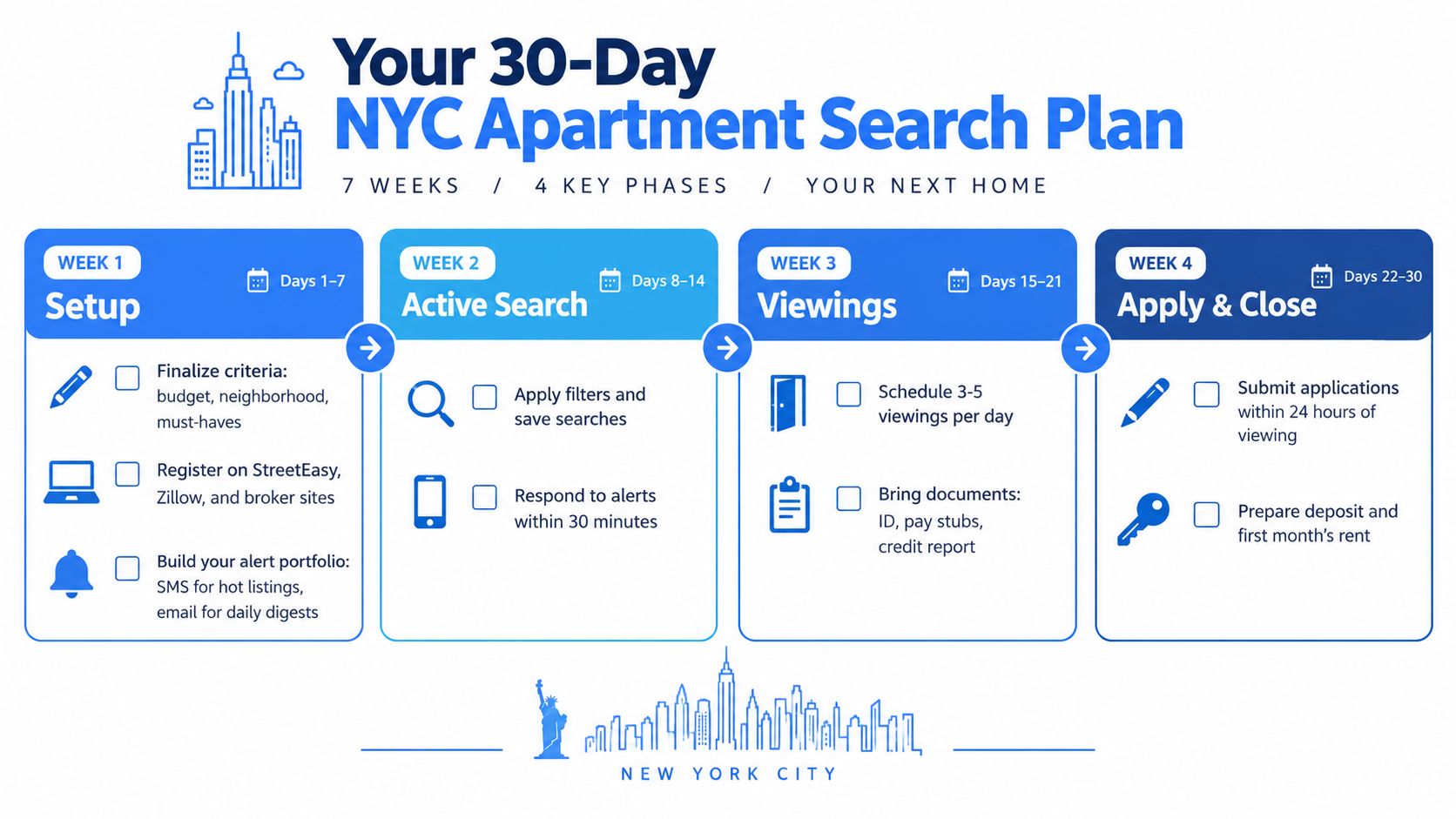
Use the first week to build a system, not to browse endlessly. Finalize your budget and neighborhood layers, register on the marketplaces and broker or landlord sites relevant to your search, set alerts, and prepare your application documents. If you need to plan cash beyond rent, this practical moving budget for 2026 can help you account for the move as well as the apartment.
Check progress and adjust
By day 10, make sure you have at least one useful alert arriving through each channel you rely on. If nothing relevant is coming through, check whether a filter is too strict before widening the budget. By day 20, review the apartments you've viewed and adjust your neighborhood list or must-haves based on what you've learned in person. Walk the blocks around promising listings when you need to check the commute, building surroundings, or local feel.
By day 30, aim to have an accepted application or a clear reason to revise your plan. If viewings keep landing at the same time, tell contacts your available windows early and rank which apartments deserve priority. If alerts go quiet, add a stretch neighborhood or revisit a preference. If a broker fee makes a seemingly perfect match unaffordable, calculate the full upfront cost before booking another viewing.
RentReboot monitors apartment listings across more than 20 platforms, matches them to saved search criteria, and sends email or SMS alerts, with tools for identifying potential rent-stabilized apartments and comparing neighborhood rent distributions. Set up your search and visit RentReboot to keep your coverage running while you focus on viewings and decisions.